添加目录模板代码
打开themes/landscape/layout/_partial/article.ejs,添加目录模板代码为如下段的代码:
1
2
3
4
5
6
7
8
9
10
11
12
13
14
15
16
17
18
19
| <div class="article-entry" itemprop="articleBody">
<% if (post.excerpt && index){ %>
<%- post.excerpt %>
<% if (theme.excerpt_link){ %>
<p class="article-more-link">
<a href="<%- url_for(post.path) %>#more"><%= theme.excerpt_link %></a>
</p>
<% } %>
<% } else { %>
<!-- Table of Contents -->
<% if (!index && post.toc){ %>
<div id="toc" class="toc-article">
<strong class="toc-title">文章目录</strong>
<%- toc(post.content) %>
</div>
<% } %>
<%- post.content %>
<% } %>
</div>
|
注意:layout/post.ejs内容为<%- partial('_partial/article', {post: page, index: false}) %>,故传到article.ejs中时index为false,一定会走else分支,显示内容,并讨论是否生成目录。在markdown文件前置内容声明:toc: true,最后渲染生成的页面里会出现目录
设置目录样式
进入layout/source/css/_partial/目录下,创建toc.styl,并在source/css/sytle.styl中加入@import '_partial/toc'
toc.style
1
2
3
4
5
6
7
8
9
10
11
12
13
14
15
16
17
18
19
20
21
22
23
24
25
26
27
28
29
30
31
32
33
| .toc-article {
background: #eee;
padding: 1em;
position: relative;
left:2em;
}
.toc-article .toc-title{
padding-bottom: 0.8em;
font-weight: bold;
}
#toc {
line-height: 1.1em;
font-size: 0.8em;
float: right
}
#toc .toc {
padding: 0
}
#toc li , .toc li {
list-style-type: none
}
#toc ol {
margin: 0;
}
#toc .toc-child {
padding-left: 1.5em
}
|
最后效果图
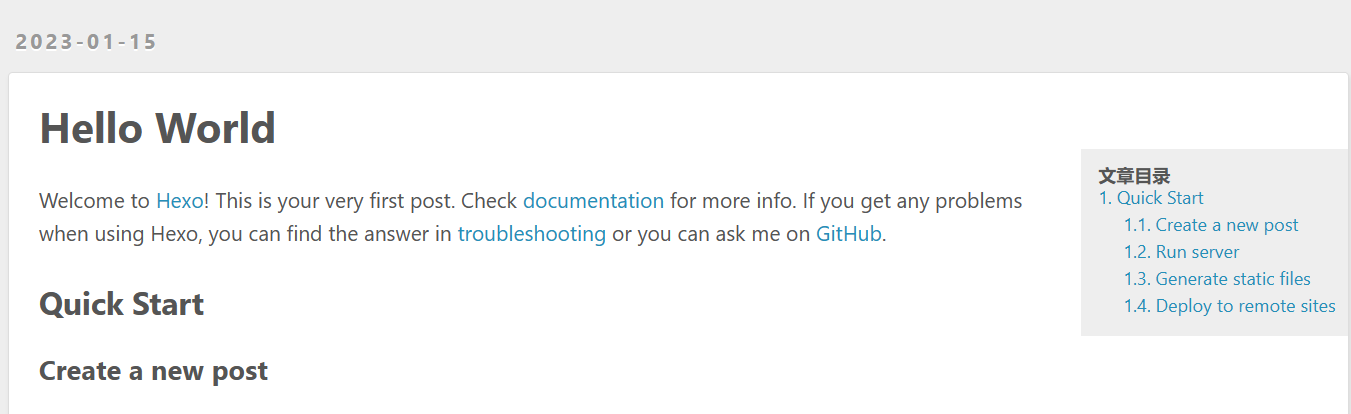
参考文献:hexo优化目录
Hexo添加Toc支持,生成文章目录
创建于2023.1.16/12.50,修改于2023.1.16/13.24